Built for the Clair Z1
mAIday
Describe the analysis you want, in plain English. mAIday assembles it from vetted modules, runs it on your own computer, and saves it as a workflow anyone can re-run.
mAIday means that help is just a sentence away
Type what you need — “run a viability scan on wells A1 to C2”, or “repeat the study in this paper”. mAIday plans the workflow, wires it up, and shows you every intermediate output as it runs.
mAIday
Z1 connected
- Opened run 21 · 3088×2076
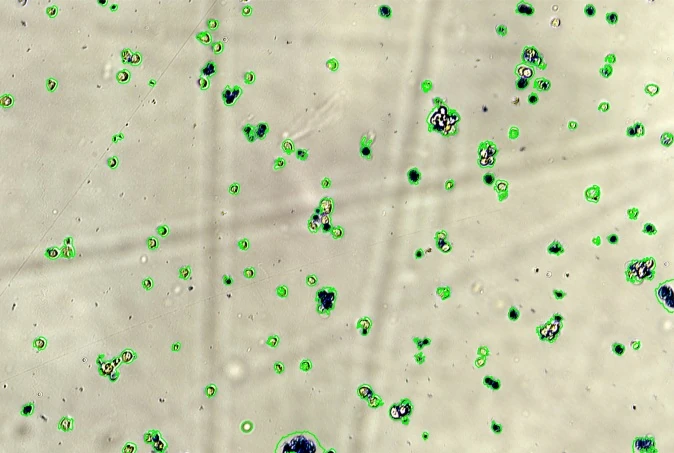
- Segmented 325 cells · 4 nodes
- Classified live / dead
- Dry mass per cell · exported
Assembled from vetted modules
Nothing is improvised. Every step is a tested module written and checked by us — the model only decides how they connect, and you see the result of each one.
Acquire
Load
Segment
Classify
Morphology
Statistics
Export
Modules
Instrument control · Data loading · Metadata · Segmentation · Morphology · Classification · Dry mass and phase metrics · PCA and statistics · Plotting · Export
A worked example
Label-free morphological profiling of a dose–response. Image a 96-well plate, segment every cell, extract forty phase and shape features from each well, reduce and cluster them by phenotype, then fit a dose–response curve per phenotype and export the figures.
Written by hand
2–3 days
Several hundred lines of Python across five libraries, plus a script to drive the microscope — and only if someone in the group already codes.
With mAIday
~20 minutes
One paragraph in the chat, then a few refinements as the outputs appear. The finished workflow is saved, so the next plate is a single click.
The worked example took around 20 minutes to build and refine with mAIday; for an experienced programmer it would be 2–3 days of work, or ~€1,000 of postdoc time.
What it changes
Advanced image analysis, without the tooling. One place to run the instrument, analyse what comes off it, and hand the whole workflow to a colleague.
No learning curve
No macros, no scripting, no waiting on a bioinformatician. If you can describe the experiment, you can run the analysis.
Measurement to figures
mAIday drives the Z1 as well as the analysis, so nothing is exported, converted or carried between machines.
Your data never leaves
Every computation runs on your own machine. Only your instructions and the workflow description reach the language model — never your images.
Reproducible by design
A workflow is saved as a spec, not a screenshot: send it to a colleague, reload it next year, get the same analysis.
Any assay the module library covers
The same modules recombine for a new question, so a method nobody in the lab has run is a sentence away rather than a project.
A library that grows
Modules are written, tested and versioned by us. New ones ship with each release, and you can ask for the one your assay needs.
Experiments that steer themselves
Because mAIday both runs the instrument and analyses the data that comes back, the two can be put in a loop: give it an objective and the experiment adapts while it is still running.
Measure
on the Z1
Analyse
on your machine
Compare
against the goal
Decide
what to image next
Repeat until the objective is met.
What it costs
Lab
academic · up to 6 users
€59 / month
3 new workflows a month
Core facility
academic · up to 15 users
€149 / month
10 new workflows a month
Industry
commercial · tailored
from €399 / month
Custom allowance and support
- Re-running a saved workflow is free.
- Compute runs on your own hardware.
- All workflows are shared by the group.
- Extra workflows €20 each.
- Community workflow database included.
- Two months free with annual billing.